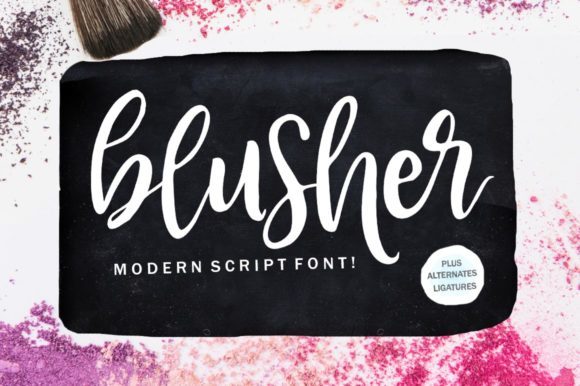
Blusher: A Stunning Brush Pen and Pencil Pairing
There is a specific kind of magic that happens when two distinct tools come together to create something greater than the sum of their parts. Blusher is not just another font; it is a curated experience designed to bridge the gap between the precision of technical drawing and the fluid emotion of hand-lettering. By combining the sharp, reliable lines of a pencil with the soft, expressive strokes of a brush pen, this script brings an authentic, endearing quality to any project.
For designers, educators, and creative entrepreneurs, finding a typeface that feels both professional and personal can be a challenge. Blusher solves this by offering a visual narrative that invites the viewer in. It mimics the tactile sensation of holding a pen on paper, complete with the subtle variations in line weight that only a human hand can produce. This isn't about perfect, robotic uniformity; it is about capturing the energy of the moment.
The Art of Authentic Expression
Why does Blusher resonate so deeply with creators today? The answer lies in its ability to convey warmth without sacrificing readability. In a digital landscape often dominated by sterile sans-serifs and overly polished vector graphics, there is a growing demand for content that feels grounded and real. When you use Blusher, you are essentially injecting a sense of humanity into your work.
The "brush pen" aspect of the design provides the dramatic flair. These characters feature thick downstrokes and delicate upstrokes, creating a dynamic rhythm that guides the eye across the page. However, what truly sets this pairing apart is the integration of the "pencil" element. This adds a layer of texture and structure, grounding the flowy script in something tangible. It looks as though the text was sketched out first, then refined with ink, resulting in a look that is incredibly endearing yet undeniably structured.
This duality makes Blusher versatile enough for high-end editorial layouts while remaining accessible for a weekend DIY enthusiast. Whether you are designing a wedding invitation, a brand logo, or a social media graphic, the font carries a built-in story of craftsmanship and care.
Creative Applications Across Industries
The beauty of Blusher is its adaptability. Because it balances elegance with approachability, it fits seamlessly into various professional contexts. Here are several ways different users can leverage this unique script to elevate their projects:
- Branding and Identity: Small business owners and freelancers often struggle to find logos that feel friendly yet trustworthy. Blusher is perfect for boutique brands, artisanal food products, or creative agencies. The pencil strokes suggest a handmade origin, while the brush elements add a touch of sophistication.
- Content Creation and Blogging: For bloggers and publishers, headers need to stand out without dominating the text. Using Blusher for pull quotes or article titles creates a visual break that feels organic. It transforms a standard blog post into a curated magazine spread.
- Educational Materials: Educators looking to make lesson plans or worksheets more engaging will find Blusher invaluable. It softens the tone of educational content, making complex topics feel more inviting to students of all ages.
- Event Planning: From wedding invitations to party banners, the endearing nature of the font is ideal for celebrations. It captures the excitement of an event while maintaining the necessary clarity for dates and locations.
Practical Implementation Strategies
While the aesthetic appeal of Blusher is undeniable, using it effectively requires a thoughtful approach. To ensure your results remain clear, effective, and organized, consider the following guidelines for application.
Contrast is Key. Since Blusher is a display script with significant character, it works best when paired with clean, neutral body text. A simple sans-serif like Helvetica or a classic serif like Garamond allows the Blusher headings to shine without competing for attention. Avoid pairing it with other decorative scripts, as this can quickly lead to visual clutter and reduced legibility.
Context Matters. The font's "pencil" influence gives it a sketch-like quality that might not suit every serious context. If you are designing a financial report or a legal document, Blusher may undermine the authority of the message. Reserve it for projects where creativity, emotion, or personal connection is the primary goal.
Scale and Spacing. One of the most common mistakes when using script fonts is setting them too small. The intricate details of the brush and pencil strokes need room to breathe. Ensure your font size is large enough for the details to be visible, and pay close attention to letter spacing (kerning). Tight tracking can cause the elegant loops of the script to merge, while loose tracking can make the text feel disjointed.
Tailoring the Look for Your Audience
Different audiences respond to different nuances within the Blusher design. Understanding how to tweak the presentation can help you hit the right note with your specific demographic.
- For the Modern Minimalist: Use Blusher sparingly. Apply it to a single word or a short phrase against a stark white background. Let the negative space do the heavy lifting. This approach highlights the unique shape of the letters and appeals to an audience that values simplicity and high-end design.
- For the Creative Hobbyist: Experiment with textures. Overlay the text on top of watercolor backgrounds, paper grain images, or soft gradients. The pencil strokes in the font will interact beautifully with these textures, enhancing the DIY aesthetic and encouraging viewers to engage with the content.
- For the Corporate Marketer: Focus on consistency. Create a set of branded assets using Blusher for headlines and subheads. Ensure the color palette remains cohesive. By treating the script as a core part of the brand identity rather than a fleeting trend, you build a recognizable voice that stands out in crowded marketplaces.
Maintaining Quality and Originality
In the rush to produce content, it is easy to rely on default settings or generic templates. However, true creativity comes from intentionality. When working with Blusher, take the time to review your output. Does the text feel forced, or does it flow naturally with the surrounding elements?
To keep your results original, avoid overusing the font. Just because it is gorgeous doesn't mean it should be everywhere. Use it to highlight key moments in your design—the title of a book, the name of a product, or the headline of a newsletter. This strategic placement ensures that Blusher retains its impact and doesn't become background noise.
Furthermore, consider the cultural context of your audience. The "handwritten" style is universally understood as a sign of effort and care, but the specific execution of Blusher leans towards a contemporary, artistic vibe. Ensure this aligns with the values of the people you are trying to reach. If your audience is traditional, you might want to pair it with more classic design elements. If they are trend-conscious, you can push the boundaries with bold colors and experimental layouts.
Final Thoughts on Creative Potential
Blusher represents more than just a collection of glyphs; it is a tool for storytelling. By leveraging the stunning pairing of a brush pen and pencil, it offers a way to communicate that feels authentic, warm, and deeply human. Whether you are a seasoned designer refining a brand identity or a hobbyist putting together a scrapbook, this font provides the foundation for work that resonates.
As you explore your own creative possibilities, remember that the best designs are those that serve a purpose while delighting the senses. Blusher delivers on both fronts. It encourages you to step away from the rigid constraints of digital perfection and embrace the beautiful imperfections of the handcrafted world. So, pick up your virtual pen, open your design software, and let Blusher bring your next project to life with a touch of genuine inspiration.